ImageCompat

Upload guidance

Why an Etsy listing image may look blurry

Check Etsy listing image resolution, framing, and thumbnail clarity before product photos appear in search.

Check your Etsy listing imageImages never leave your device.

What this checks

  • Source resolution
  • Small-preview clarity
  • Crop risk
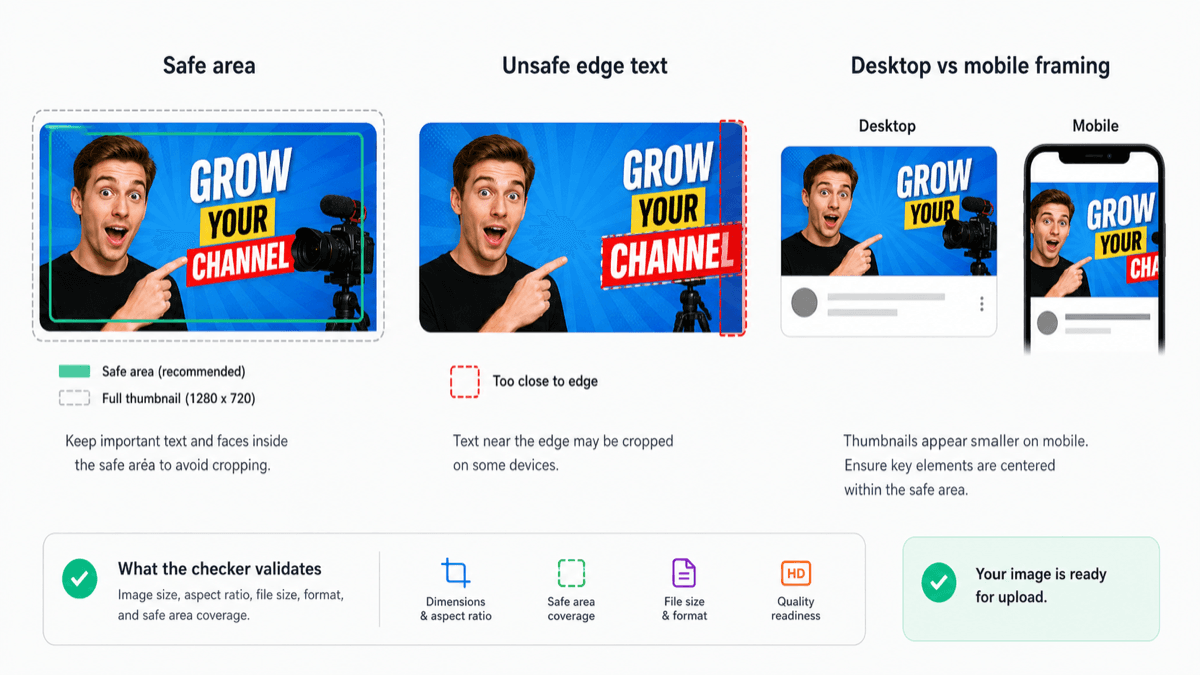
A thumbnail can pass dimensions but still fail visually if the subject or text becomes hard to read.
Thumbnail example showing mobile preview framing and quality checks.

Small images lose detail

Etsy listing images need enough resolution to survive search thumbnails, listing pages, and zoomed views. If the original file is small, the image may look soft after Etsy resizes it. Marketplace sellers comparing store images may also find the Shopify product image size guide useful.

Thumbnails need clear framing

A product that fills too little of the frame can feel weak in search results. A product that touches the edges can feel cramped after cropping.

Before you upload

Use a high-resolution image with the product centered and enough margin. Keep the first image's framing consistent with how you want it to appear in Etsy thumbnails. The Etsy listing image checker can quickly flag size, format, and thumbnail framing risks. Etsy's own help page for listing photos is the best place to confirm current upload details: Etsy listing photos help.