ImageCompat

Upload guidance

Instagram crop preview guide for stories

Preview how Instagram story crop behavior can affect vertical images, UI-safe areas, and edge content before you post.

Check your Instagram storyImages never leave your device.

What this checks

  • 9:16 story frame
  • Feed/story crop risk
  • UI safe area
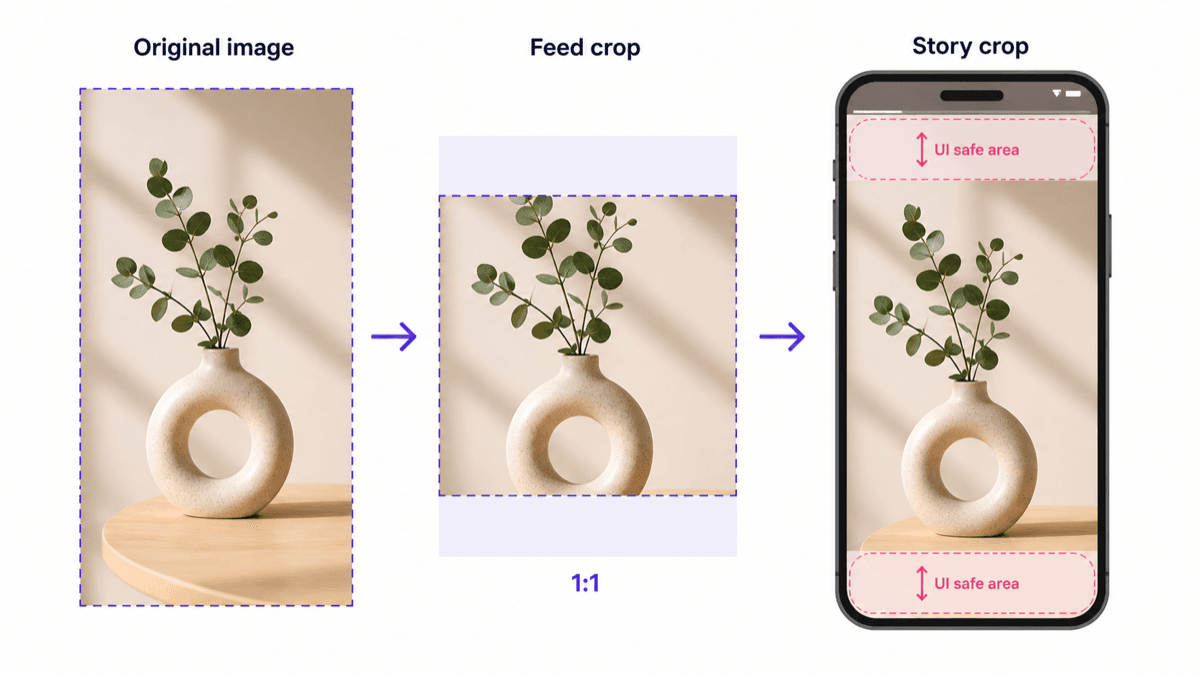
Instagram images may need to work as the original upload, a feed crop, and a story with UI controls.
Instagram example showing original image, feed crop, and story crop with UI safe areas.

Stories are full-screen

Instagram stories use a tall 9:16 frame. If you are wondering how to crop a story on Instagram, the safest approach is to start with a vertical image and keep important content away from the edges. Images that are not vertical may be cropped or displayed in a way that changes the focus of the image. If you are checking a feed image instead, use the Instagram post crop guide.

Edges are risky

Story controls and phone screens can make top, bottom, and edge content less reliable. Keep important text, faces, and product details inside the safer center area.

Use the preview first

The Instagram story checker helps you spot full-screen crop risk and edge issues before the image reaches the app.